The four Claude Code plugins to install first.
Claude Code can do more when you add plugins, which are small packages of extra skills and tools, but each one uses a little of Claude's working memory in every session and some of them run code on your PC. Many lists tell you to install twenty. I picked four for people who make content rather than write code, and checked what each one costs.
The four at a glance
Each plugin, what it does, what it adds to every session, and the line to type in PowerShell. Details and screenshots are further down.
frontend-design
Makes Claude design pages with a point of view instead of a template.
$ claude plugin install frontend-design@claude-plugins-official
superpowers
Claude asks questions and makes a plan before it builds.
$ claude plugin install superpowers@claude-plugins-official
humanizer
Rewrites text that sounds like AI so it reads like a person.
$ claude plugin marketplace add blader/humanizer
$ claude plugin install humanizer@humanizer
Playwright
Lets Claude open a page in a real browser, look at it and take a screenshot.
$ claude plugin install playwright@claude-plugins-official
On a brand new setup, add Anthropic's official list once first. The step is under How to add one.
- plugin: a small package that adds skills or tools to Claude Code.
- skill: a saved set of instructions that Claude follows when it fits the job.
- marketplace: a catalog of plugins that Claude Code can install from.
- session: one conversation with Claude Code, from when you start it until you close it.
- hook: a small script that runs by itself at a set moment, for example when a session starts.
- token: the unit Claude counts its working memory in, roughly three quarters of a word.
- MCP: a standard way to connect Claude to outside tools, such as a web browser.
- Claude Code installed and signed in, in the desktop app or in a terminal, which needs a paid Claude subscription or an Anthropic Console account. If you have not done that yet, start with Install Claude Code on Windows.
- For Playwright only: Node.js on your PC. Type node -v in PowerShell to check, and any number means you have it.
How to add one
In the desktop app, open the Code tab, click the + next to the prompt box, choose Plugins, then Add plugin, pick the plugin and choose Install for you. In a terminal, type the line shown under each plugin below. On a brand new setup, type claude plugin marketplace add anthropics/claude-plugins-official once first, because Claude Code only adds Anthropic's official list by itself the first time you open a normal session, and without it the install lines below say the plugin was not found. Installing all four takes about half a minute, and the files take 25 MB.
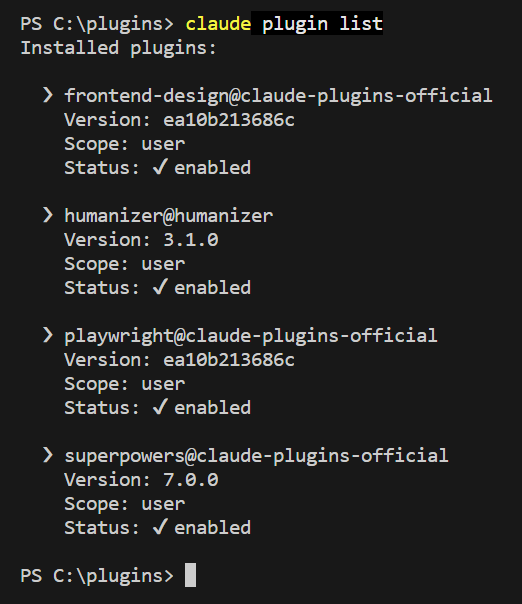
When all four are in, check with this line. Every plugin should say enabled.
Type this in PowerShell
$ claude plugin list
What each one costs
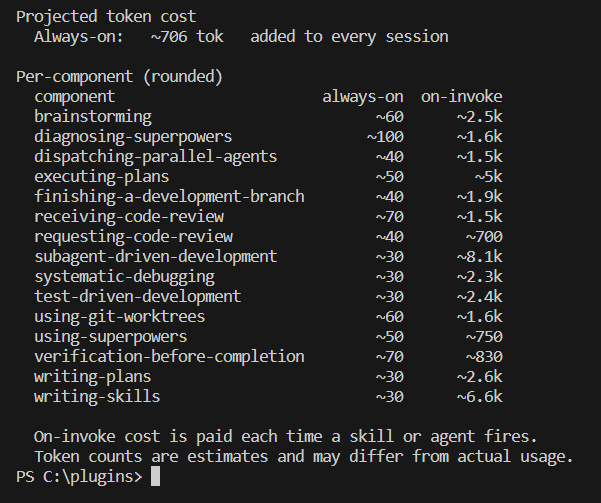
After installing, the command claude plugin details followed by the plugin's name shows how much it adds. These are the numbers:
| Plugin | Added to every session | When Claude uses it |
|---|---|---|
| frontend-design | about 59 tokens | about 2.3k |
| superpowers | about 700 tokens | from about 0.7k to 8k, depending on the skill |
| humanizer | about 90 tokens | about 8.1k |
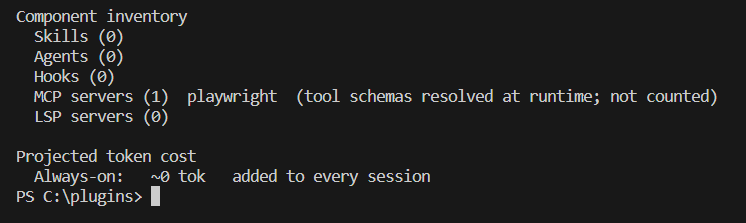
| Playwright | 0 counted | not counted, the browser tools are only listed when it runs |
Tokens are the units Claude counts its working memory in. Smaller is better, and these are estimates from Claude Code itself, not exact bills.
How to read the two columns.
- Added to every session is the short card of the plugin: its name and a one line description. Claude reads it every time you start, so you pay this small amount even on days you never use the plugin.
- When Claude uses it is the size of the full instructions of the plugin. Claude loads them only when your request fits, for example humanizer when you ask for a text that sounds less like AI, or when you call the plugin by name. Then those instructions (about 8.1k for humanizer) stay in the conversation until you start a new one. If you never ask for it, you never pay it.
- Neither number grows with your text. They measure the plugin itself. The text you give Claude is counted on top of that, like in any chat, so a longer text costs more with or without a plugin. A file with a million words would be far too long for one conversation anyway.
Type this in PowerShell
$ claude plugin details superpowers
1. frontend-design: pages with a point of view
What this is: a skill that tells Claude to design pages with a point of view instead of the usual template.
Type this in PowerShell
$ claude plugin install frontend-design@claude-plugins-official

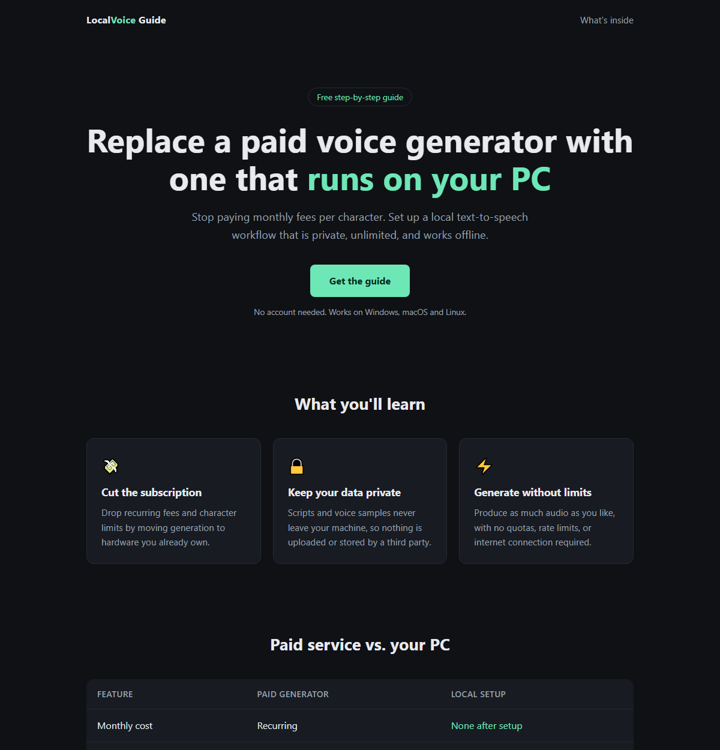
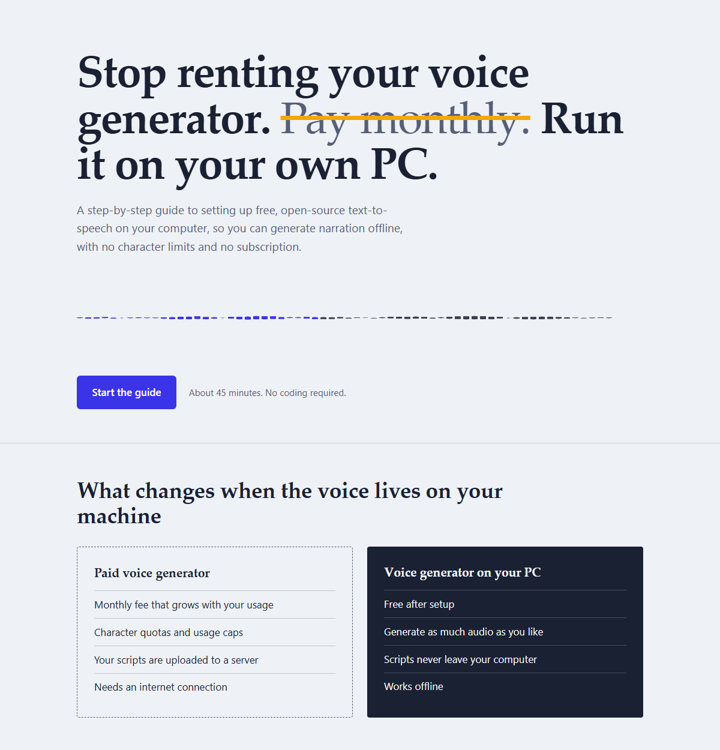
I gave Claude the same request twice: a one-file landing page for the voice guide. The second time I added "Use the frontend-design skill."
2. superpowers: Claude asks first, then builds
What this is: a set of skills that make Claude ask questions and write a plan before it builds.
Type this in PowerShell
$ claude plugin install superpowers@claude-plugins-official

I wrote one sentence, "I want a website for my newsletter about free AI tools. Build it.", with and without the plugin.
For a site you care about, those questions save a round of fixing.
It works best with Git for Windows installed.
3. humanizer: text that sounds less like AI
What this is: a skill that rewrites text so it sounds less like AI.
Type this in PowerShell
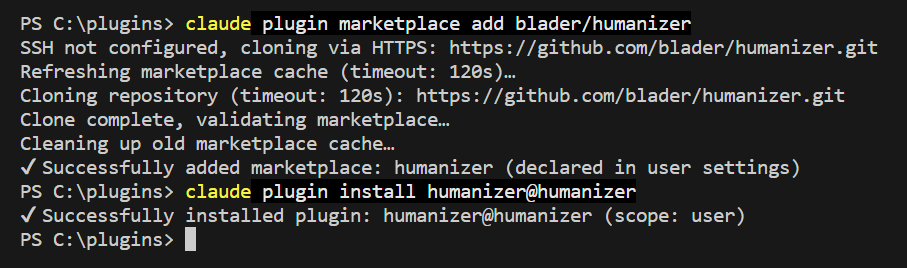
$ claude plugin marketplace add blader/humanizer
claude plugin install humanizer@humanizer
I wrote a paragraph full of AI habits and asked Claude to rewrite it twice, once with "make it sound more natural" and once with "use the humanizer skill".
The plain rewrite kept the list of benefits and the "Let's get started" ending. The humanizer version cut them, and when the text had no real facts to add, it asked which generator I meant.
4. Playwright: let Claude look at the page it made
What this is: lets Claude open a page in a real browser, look at it and take a screenshot. It needs Node.js on your PC.
Type this in PowerShell
$ claude plugin install playwright@claude-plugins-official

Type this in PowerShell
$ claude plugin details playwright
I asked Claude to open a page, read its main heading, count the numbered steps and save a screenshot.
Tip: Playwright controls a real browser and can visit any page you point it at, so point it at pages you trust.
Next on my list
Many creators talk about these plugins, and I have not covered them yet. My take and the results come in a later post.
Context7 looks up the newest documentation for a coding library.
OmniRoute is a gateway that sends your requests to other AI models, for example when you reach a usage limit.
Ponytail aims to make Claude write less code, and Graphify builds a graph of a codebase so Claude can find its way around it.
These are short descriptions from creators who cover them, not results from my own tests.
How to remove one
Type the same line with uninstall in place of install, for example:
Type this in PowerShell
$ claude plugin uninstall frontend-design@claude-plugins-official
If something fails
It says: Plugin "..." not found in marketplace
Claude Code does not know Anthropic's list of plugins yet. Type claude plugin marketplace add anthropics/claude-plugins-official and try the install again. The suggestion Claude Code prints, claude plugin marketplace update, does not work until the list has been added.
It says: Please make sure you have the correct access rights and the repository exists
Claude Code tried to fetch the plugin list over SSH, which needs a key you probably do not have. In PowerShell type $env:CLAUDE_CODE_PLUGIN_PREFER_HTTPS = "1" and run the command again in the same window.
It installed and I cannot find it
Type /reload-plugins inside Claude Code, or start a new session.
How to get the best result
A plugin changes how Claude works, so a clear request gets you the most from it. Say what you want, for whom, and which plugin to use, for example: "Use the frontend-design skill and build a one page landing page for my voice guide, with a headline, three benefits and one button." Open the result and read every word before you post it. After a plugin update, your screen may look a little different from the screenshots here.
Want more on this? Follow my content and check my other posts.
Get the next guide when it is ready.
One email a week at most, and you can leave whenever you like.